National Constitution Center Presidential Decision
A decision making simulation that puts visitors in the Oval Office, across installation, desktop and mobile.
Product Design • Interaction Design

Project Overview
Client: National Constitution Center (NCC), Philadelphia, PA
Gallery: Governing the Nation — Separation of Powers
Timeline: 8 weeks (2026)
My Role: Product Designer
The Resolute Desk experience makes visitors President for a day. Set against the actual Resolute Desk, they work through a presidential to-do list, hear from in-character advisors, make high-stakes decisions, and see how real presidents handled the same situations.
The experience is part of the NCC's Governing the Nation gallery, which opened May 15, 2026 as part of America's 250th anniversary programming. It was made possible by a $15 million gift, the largest single donation in NCC history. The Resolute Desk interactive was cited by name in the official NCC press release as one of the gallery's signature experiences.

My Role
UX and interaction design across kiosk, mobile and desktop
Visual design system and UI component
Prototyping and cross-functional collaboration with developers and PMs
Client presentations and stakeholder reviews
User testing and iterative design based on feedback
ADA and WCAG 2.1 AA compliance across kiosk and web
Challenge
Make presidential decision-making feel personal to a museum visitor who might only spend 3–5 minutes at a kiosk
Design for a wide audience: students, families and casual visitors sharing one device
Extend the experience to mobile and desktop without losing kiosk immersion
Navigate strict client content and legal requirements across multiple review rounds
Balance deep educational content with engagement

Solution
A to-do list of 5 visible tasks plus rotating surprise tasks that unlock mid-session for continued engagement.
Physical desk props (pen, stamp, phone) that turn on-screen choices into real gestures.
Opt-in advice system so visitors could choose to go deeper without being slowed down.
Adapted the full experience to mobile and desktop where physical artifacts don't exist.
Research Insights
1. Clarifying our goals
We started with a client brief from NCC covering target visitors, educational goals and the gallery layout. A key early insight was the physical desk itself: the pen, stamp and phone had to sit within ADA touchable range, which shaped the interaction model. The tablet, originally a physical prop, became the visual anchor for the digital task checklist. I also reviewed the historical content from NCC's historians and education team to understand the scope and depth of each presidential task.

2. Defining Research
Visitor Research NCC's visitor data on demographics, dwell times and engagement surfaced three key profiles: school groups, civically engaged adults and history enthusiasts.
Competitive Analysis We benchmarked similar interactives for patterns around touch surfaces, layered content and object-anchored storytelling to inform our design direction.
Client Working Sessions In weekly sessions, NCC's educators and historians guided the content while our team turned it into concepts and prototypes.

3. Discovery & exploration
Site visits and research into the desk's history pointed to a clear direction: don't explain presidential power, let visitors feel it. Visitors would take the President's seat for a day, with their agenda on a live touchscreen and physical props within reach.
Defining the Experience
After aligning with NCC, we settled on a clear interaction model: visitors work through a presidential to-do list, make decisions and see the consequences, including what a real president did in a similar situation, with archival photos and constitutional context.
The task list has two layers: five standard policy tasks and four hidden surprise tasks, two of which unlock mid-session. The surprise tasks reward visitors who stay engaged and make the experience feel human, not bureaucratic.
Wireframes
With the structure defined, we moved into iterative wireframing, testing layouts and validating concepts with NCC. Content from the client arrived alongside every round, shaping what appeared on screen and how visitors moved through it. Five versions shaped the final form.


Version 1 The first wireframes established the core loop with the to-do list living on a separate physical tablet alongside the kiosk.
Version 2 The tablet checklist moved into the kiosk as a persistent sidebar so visitors could track their progress throughout the experience.
Version 3 As content from NCC started arriving we began exploring how documents and phone transcripts would appear on screen.
Version 4 We introduced an opt-in advice button and paired audio with transcripts giving visitors more depth before making a decision.
Version 5 Physical desk props like documents and newspapers began taking visual form pointing toward the final design language.
Visual Design and Iterations
We presented two visual directions to NCC: an immersive wood-textured desk with scattered props (notepad, pen, newspaper, presidential brief), and a cleaner editorial layout with modern typography. NCC chose the desk.
The gallery's colors and materials guided us, but the interactive needed its own visual language. We treated the wood grain as the canvas and designed every UI element as an object a president might have on their desk: notepad, brief folder, tablet, coffee cup. Gold marked primary actions and task titles, dark overlays signaled consequence, and a "Constitution Daily" newspaper delivered the headline reaction to each decision. Typography stayed bold and condensed: formal, but not bureaucratic.
We then refined the two screens visitors use most, the task screen and the consequence reveal, over four iterations:

Iteration 2: Simplified the title to "Be the President" and added a "Get Advice" button, separating the optional historical context from the core decision. A text-only consequence reveal felt flat next to the rich desk.
Iteration 4: Gave tasks clear, consistent titles (e.g. "Review New Legislation"), styled the newspaper as a front page with headline, photo and byline, and tightened the sidebar for legibility. This is the version that shipped.
Client Collaboration
NCC cared a lot about getting details right. Content accuracy, legal clearance and educational integrity mattered most. The project went through internal wireframe review, alpha, beta and pre-install sign-off. Each of these phase led to changes.

What changed in Alpha
Alpha raised legal and content limits. Federal seals weren't allowed, so I redesigned the stamps as stylized props. Headlines needed clear sourcing, so I switched several consequence screens to original "Constitution Daily" headlines. Advisor scripts were too long for a kiosk, so I cut them to three or four sentences and moved extra detail into an opt-in "Learn More" section. Surprise tasks also got a dedicated "Skip" button so visitors wouldn't feel stuck on a task they didn't want.
What changed in Beta
Beta testing refined the experience further. Visitors liked the surprise tasks and rarely skipped them, so we removed the Skip button, since tapping the next task on the tablet list already let them move on. The "Menu" button next to Restart was also rarely used, so we removed it. Surprise tasks had been appearing without warning, so we added a notification banner and a "NEW" badge on the task list. Testers hesitated at the signing step so we added instruction text prompting them to sign with the desk pen. The cabinet folder gained detail, with paperclipped photos and sign-off instructions under each nominee profile. Finally, I checked contrast, touch targets and timing to meet WCAG 2.1 AA across kiosk and web.
The Experience
Screen by Screen

1 Home Screen
The opening screen frames the experience: a wide view of the desk with the to-do list on the tablet, documents animating into the screen with a pen and a coffee cup. Visitors understand the premise before reading any instructions.

2 Task List
Tapping the tablet opens the president's schedule: A surprise task can appear alongside the five standard tasks once it unlocks mid-session.

3 Decision to Consequence
Each task moves from a brief, to a decision, to a consequence reveal showing what a real president did in a similar situation. On most tasks, visitors can tap "Get Advice" to hear from a Presidential Advisor through a short call, an email on the tablet or a written memo. The advice gives context without telling visitors what to choose, and it's never required, so visitors can engage at whatever depth they like.
Once they decide, the interaction becomes physical: visitors sign with the desk's pen to approve or press a stamp to veto or pardon. This small gesture turns an on-screen choice into something closer to the real act of governing.

4 Surprise Task
Mid-session, a banner announces a new task has been added. Surprise tasks like Pardon a Turkey or Plan a Camp David Getaway are lighter in tone but grounded in real history.
Adapting to Mobile & Desktop
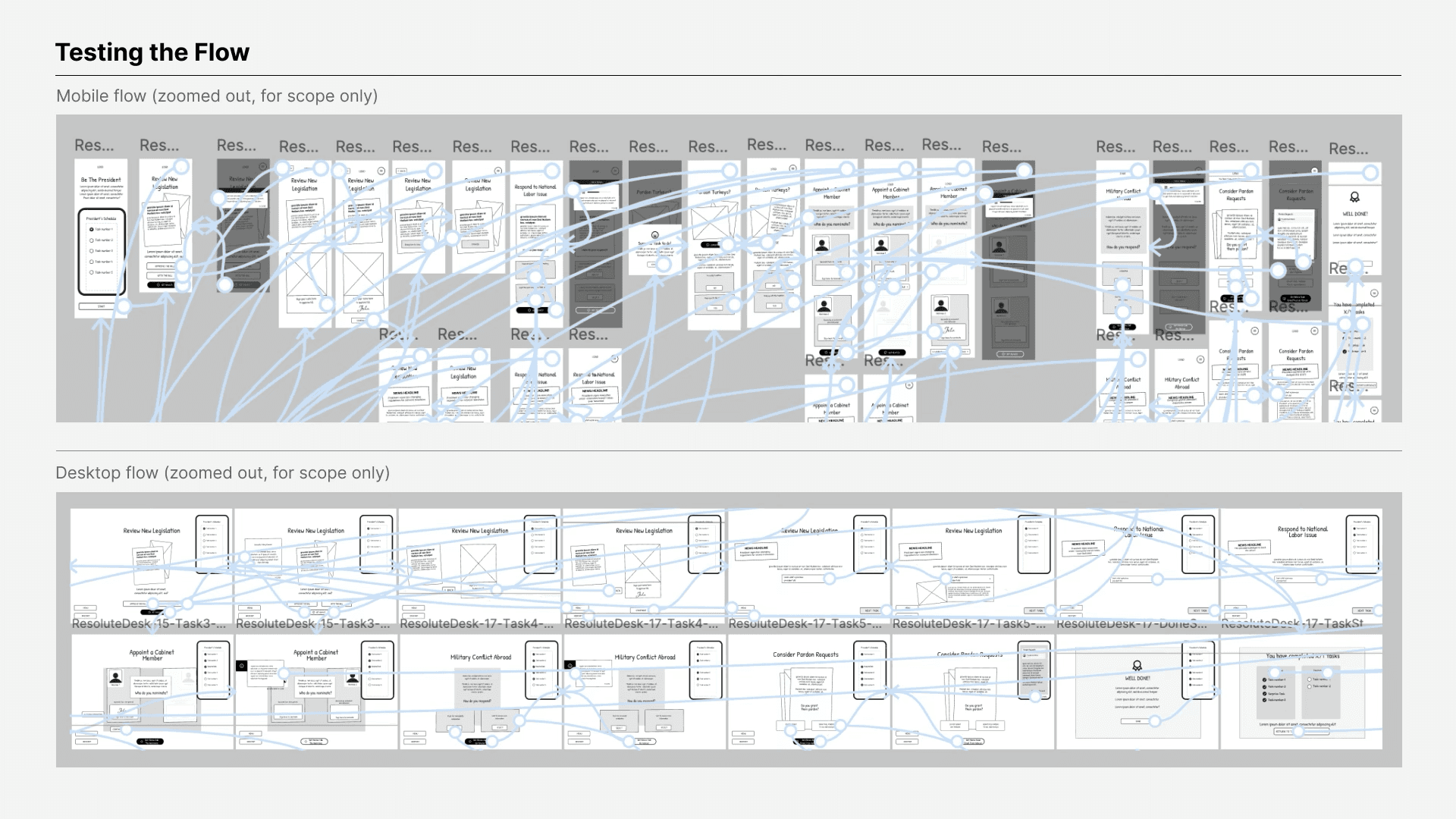
Once the kiosk experience was finalized, NCC wanted it to reach people beyond the museum for educational use. We adapted it for mobile and desktop, starting with wireframes to rework the layout without the physical desk props.

Wireframing the layout
Once the structure held up, we tested it as an interactive prototype before moving into final visual design.
Testing the flow
The tasks and the wood-and-gold visual system carried over. Desktop stayed close to the kiosk, since its screen could hold the same wide composition. Mobile needed a redesign, not a shrink. With no physical pen, stamp, tablet or phone, every interaction had to happen on screen:
Get Advice became a text pop-up instead of a phone call.
The task checklist moved from the tablet sidebar into the hamburger menu.
The layout reflowed into a single portrait column.
Surprise tasks appear as a full-screen popup, since there's no visible checklist.


Outcomes
Shipped to a permanent gallery. The Resolute Desk is a signature experience in NCC's Governing the Nation gallery, and it's named in the official press release.
Built for reach beyond the museum. Because it runs on kiosk, mobile and desktop, it can extend into NCC's classroom programs, which already reach 6 million students a year.
Shaped by testing. The Skip button was added and then removed, the Menu button was removed, and pen instructions were added, all based on how visitors actually used it.
Accessible across all surfaces. WCAG 2.1 AA compliance confirmed on kiosk and web.
Lessons Learned
Constraints gave the design personality. When NCC asked us to drop the government seal and other official graphics, we invented original props, including "Constitution Daily," a fictional outlet that became a memorable way to deliver the news of each decision.
Test what clients can't see. The pen instructions, the Skip button's removal, the Menu button's removal, and the Learn More placement all came from user testing, not client feedback.
Give people a role, not less content. I assumed dense, real-world content needed trimming to hold attention. Instead, giving visitors a role and a real decision turned the same content into something they wanted to dig into.
Translate, don't shrink. Mobile and desktop ran on a separate timeline with a different dev team. I assumed they just needed a smaller kiosk layout, but the pen, stamp and advice call had no screen equivalent, so we redesigned them instead of shrinking them. Next time, I'd plan those translations earlier.